

One inbox for your team, with an office that answers first.
Every customer conversation from every channel in one list. Your office answers what your rules cover and brings the rest to you; your team assigns conversations, leaves notes the customer never sees, and takes over whenever they want.
Updated 16 October 2026
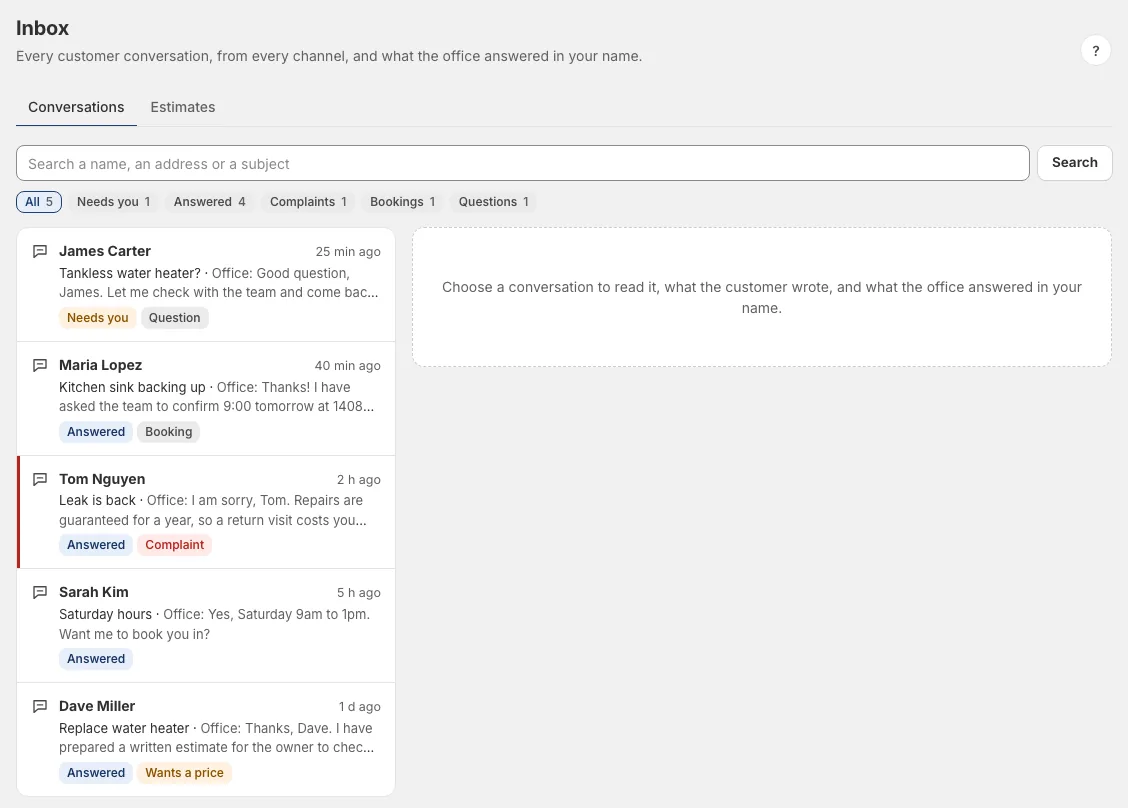
Every conversation in one list.
Email from up to five mailboxes, your website's chat, your business's Telegram bot and your own Telegram: every customer conversation is in one list, with its last word and where it stands.
- Needs you: a question your office could not answer from your rules.
- Taken over: someone in your team is answering, and the office stays out.
- Answered: the last word was yours or your office's.
Each conversation is marked by what it is about, a complaint, a booking, an order or a question, and you can filter by it. A new complaint is flagged and waits until someone has seen it.
Made for a small team.
Give it to a colleague
Assign a conversation to someone in your team. They get an email saying a conversation was given to them, without a word of it, and find it under "Given to me" in the Inbox.
Notes the customer never sees
Leave a note for your team inside the conversation. It never reaches the customer and never changes what your office answers.
Take it over
Reply yourself and your office stays out of that conversation for a day. If the customer writes again after that, the office answers again.
Write it better
"Improve with AI" turns a few words of yours into a proper reply from your rules. Nothing is sent until you press Send.
A role for each person
Owner, admin or staff. Staff work with customers, bookings and reviews, and never see your money, your own mail or your settings. A change of role applies at the next click.
Done is done
Archive a conversation to clear the list. If the customer writes again, it comes back by itself.
Why an answer said what it said.
Under every answer your office sent, the Inbox shows the rules it came from. If a customer marks an answer as unhelpful, you are asked what it should have said, and one tap opens the rule behind it so you can correct it there. See how your office answers customers.
Asked before you start.
Which channels are in the inbox?
Email from up to five mailboxes, your website's chat, your business's Telegram bot and your own Telegram. WhatsApp, Instagram and Messenger are coming.
Can the AI and my team both answer?
Yes. Your office answers what your rules cover. When someone in your team replies, the office stays out of that conversation for a day.
How many people can use it?
It depends on your plan; see the pricing page. Each person has a role: owner, admin or staff.
Does the customer see our notes?
No. A note stays inside the team and never changes what your office answers.
Read next
Set up your office in an afternoon.
Free to set up, no card needed. It reads your website, asks what it could not find, and nothing goes live until you have checked it.