

Your receipts and invoices, read and kept in order.
Send a photo, forward nothing: invoices in your mailbox are filed by themselves, e-invoices are read as data, and every figure is checked by code. You see what you owe, what you are owed and the next four weeks, and your accountant gets one tidy package a month.
Updated 15 October 2026
However your paperwork arrives.
- A photo
Take a picture of a receipt and send it to your office on Telegram or in the app, or upload it in the panel. A long till slip is read piece by piece.
- Your mailbox
Invoices that come to your Gmail or mailbox are filed by themselves. A person's email with an invoice attached is held for you, in case it is a customer with a complaint.
- E-invoices
XRechnung, ZUGFeRD, Factur-X, Peppol and Turkish e-Fatura are read as data, by code: no AI reads the numbers, and the invoice's own sums are checked.
- Your accounting tool
Suppliers' bills already in lexoffice, sevDesk, QuickBooks, Xero, FreshBooks, Zoho Books, Moneybird, Holded or Paraşüt are read from there, as data, read only.
Read, then checked by code.
From a photo or a scan, an AI copies every figure exactly as printed. Code then does the counting: each line, the lines against the total, the tax per rate, the date, the currency. A figure that does not add up is flagged for you to check, never quietly "fixed", and a reading that is not certain is read again before it counts.
The same invoice arriving twice, by mail and as a photo, is counted once. Two documents that look alike are shown to you side by side, and you decide whether they are the same.
If a supplier's invoice asks you to pay into a different bank account than before, you are told at once, before you pay. It is how invoice fraud usually works.
Flagged, never fixed
- Lines that do not add up to the total
- A number it could not read for certain
- A tax number with wrong check digits
- A supplier's new bank account
- The same invoice twice
What you owe, what you are owed, and the next four weeks.
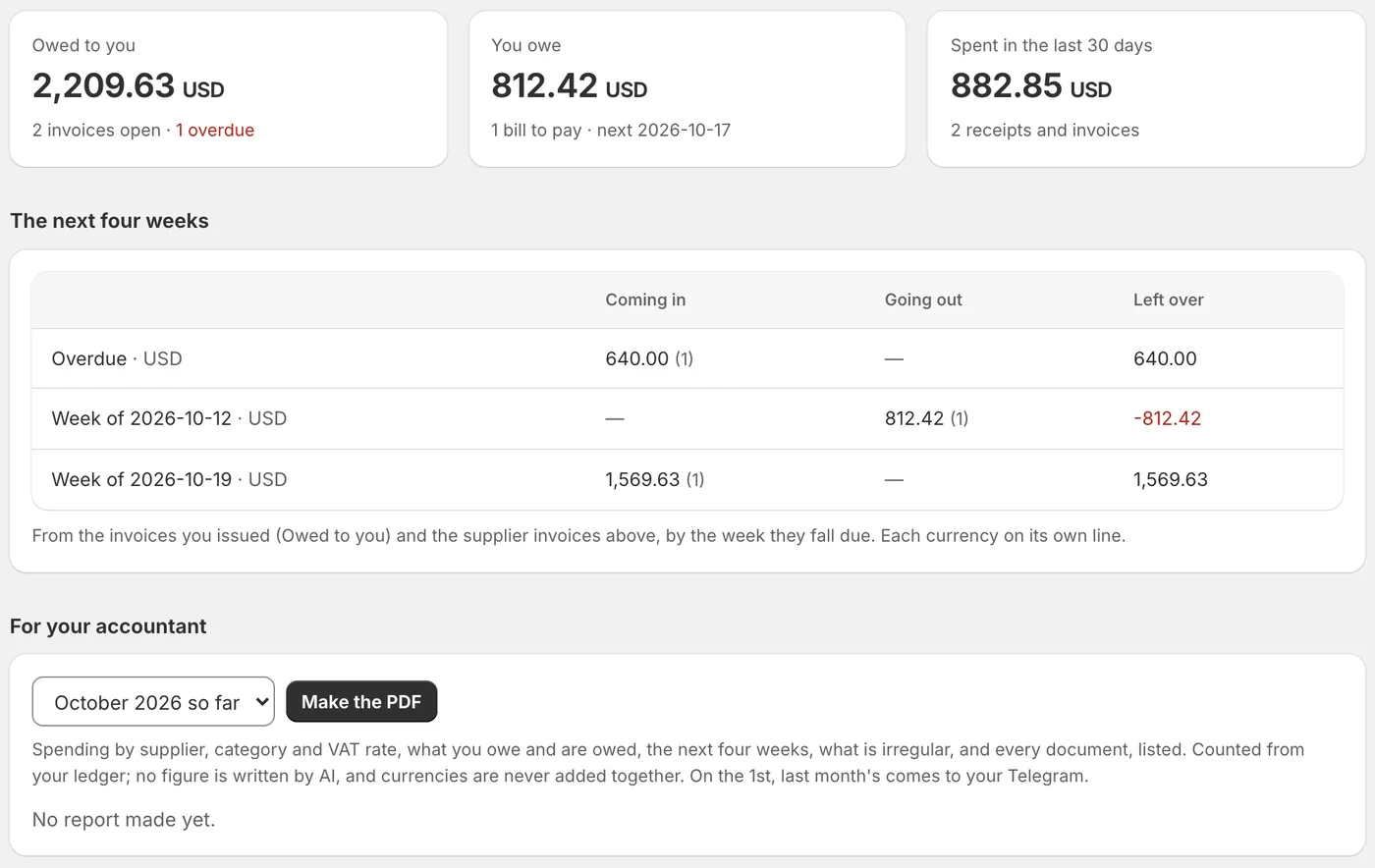
Supplier invoices stay on "to pay" until you mark them paid, or your accounting tool says they are, with the due date as printed or counted from the payment terms. The invoices you issued are followed from your invoicing tool until they are paid. The next four weeks show what comes in and goes out, week by week, each currency on its own line.
A reminder to a customer who has not paid goes only when you press it: a fixed, polite text with your own payment details, from your own mailbox. The money never passes through Neaion.
Ready for your accountant.
- A monthly PDF. Spending by supplier, category and tax rate, what you owe and are owed, what looks irregular and why, and every document listed. Every figure is counted from your records; none is written by AI.
- One package. The PDF, every document's own file and an index, in one download to hand over.
- Categories that learn. Correct a supplier's category once and their next documents follow.
- When your accountant writes. If they ask for the receipts of some months by email, a reply is drafted with those documents attached, for you to check and send.
What it does not do.
It is not your accounting software and it does not file your taxes. It does not issue legal invoices: those come from your invoicing tool, and Neaion follows them. With lexoffice it can prepare an invoice draft from a finished appointment, which you finalise there yourself. Your bank is not connected yet.
It never
- Changes a figure to make the sums work
- Adds money in different currencies together
- Writes to your accounting tool, except a draft you asked for
- Pays anything, or touches your money
Asked before you start.
Does an AI calculate my numbers?
No. An AI only copies what is printed on a photo or scan. Code does every sum, and a figure that does not add up is flagged for you, never corrected. E-invoices are read by code alone.
Which e-invoice formats does it read?
XRechnung, ZUGFeRD and Factur-X, Peppol (UBL) and Turkish e-Fatura (UBL-TR), from an XML file, a ZIP, or the file inside a PDF.
Will it file my taxes?
No. It keeps your receipts and invoices in order and gives your accountant a monthly PDF and every document in one package.
Does it work with my accounting tool?
It reads invoices and bills from lexoffice, sevDesk, QuickBooks, Xero, FreshBooks, Zoho Books, Moneybird, Holded, Paraşüt and more, read only. With lexoffice it can also prepare invoice drafts, which you finalise yourself.
Read next
Set up your office in an afternoon.
Free to set up, no card needed. It reads your website, asks what it could not find, and nothing goes live until you have checked it.