

Customers book themselves. Your calendar stays right.
Your office offers only the times your hours and your Google Calendar leave free, holds the time so two people cannot take it, and reminds the customer before they come. You choose whether it books on its own or waits for your OK.
Updated 15 October 2026
How a booking happens.
- Your hours and your calendar
You set your opening hours, breaks, closed days and services, each with its own length. Your office reads your Google Calendar to see what is already taken.
- Only free times are offered
When a customer asks for a time by email, chat or Telegram, they are offered only times your hours and your calendar leave free, long enough for the service they want.
- The time is held
Before anything is booked the times are checked again, and the time is held so that two customers can never get the same one, even if they ask at the same moment.
- Booked, or waiting for your OK
Your choice: it books on its own, or every booking waits for your Confirm. Either way the customer is only told they are booked once they really are.
You decide how much it books on its own.
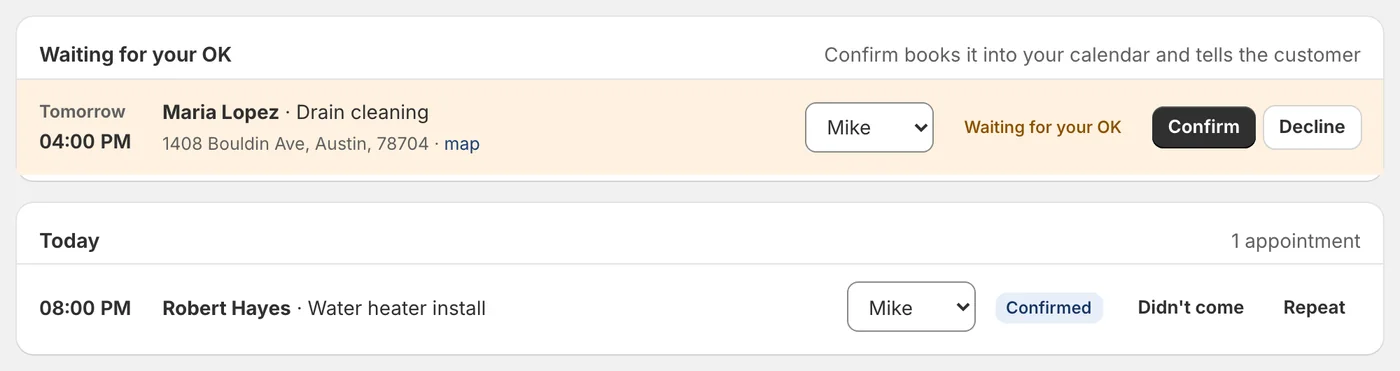
Many owners start with every booking waiting for their OK. A booking request comes to you on Telegram, in the app or in the panel with Confirm and Decline. Confirm puts it in your Google Calendar and tells the customer; Decline offers them other times of the same length.
When you trust it, let it book on its own. A customer who did not come twice in a year still waits for your OK on their next booking, and the customer is simply told the team will confirm.
After the booking.
- A reminder. One short reminder in the customer's own conversation before the appointment, 24 hours before unless you choose another time, or none.
- Cancel or move by replying. A customer can answer the reminder to cancel or move. A move books the new time first and only then lets the old one go, so nobody is left with nothing. You are told either way. A cancel or a move asked by email from a sender the mail server could not verify waits for you.
- A waiting list. When no time suits, the customer can ask to wait for a day. If a time opens that day, everyone waiting is told the free times and the first to reply gets it, through the same checks as any booking.
- No-shows. You or your team mark a customer who did not come. After two in a year, their next booking waits for your OK.
- Repeats. A regular customer can be booked every few weeks or months. Each date goes through the same checks, and a date that cannot be booked waits for you; nothing is moved on its own.
For a team on the road, too.
Tell your office who does which service, their own hours and days off. Each person can connect their own Google Calendar: their busy times make only them busy, and their jobs go into their own calendar. The same person is never booked for two jobs at once.
A job at the customer's place needs their address, inside the area you serve (a radius around your ZIP code, a list of postcodes, or cities), and travel time is kept free around it. Each person sees their day as a route on the map and can tell the customer, from their phone, that they are on the way.
A "Book online" page.
Your office also gives you a page of your own where customers pick a service and a free time. It works on a phone, in five languages, and the booking is held until the customer confirms it from the email we send them, so nobody books in someone else's name. Every confirmation email has a link to cancel or move.
What it does not do.
It books into Google Calendar; other calendars are not connected today. It does not take payment at booking: a deposit is asked through an estimate and paid with your own payment link, and the money never passes through Neaion.
It never
- Offers a time your calendar says is taken
- Books on a closed day or across a break
- Tells a customer "you are booked" before they are
- Moves or cancels anything without telling you
Asked before you start.
Do I need Google Calendar?
Yes. Your office reads your Google Calendar to see what is taken and writes each booking into it. Other calendars are not connected today.
Can it book without asking me?
Your choice. By default a booking waits for your Confirm on Telegram, in the app or in the panel. When you are ready, let it book on its own; a customer who missed two appointments in a year still waits for you.
What if two customers want the same time?
Only one can get it. The time is checked again just before booking and held in a way the database itself refuses to give twice.
Can customers cancel or move?
Yes, by answering in their own conversation or from the link in their confirmation email. A move books the new time before the old one is let go, and you are told either way.
Does it work for a team?
Yes. Each person has their services, hours and days off, can connect their own Google Calendar, and is never booked for two jobs at once.
Read next
Set up your office in an afternoon.
Free to set up, no card needed. It reads your website, asks what it could not find, and nothing goes live until you have checked it.