

Your office, while you are under the sink.
Messages come in while you are on a job. Your office answers from your rules, prepares the estimate from your price list, books the visit where your team can get to it, and keeps every job, invoice and review in order.
Updated 15 October 2026
What it takes off your hands.
- Job requests, answered. "Do you install tankless water heaters?", "Do you come to Round Rock?", "How soon can you come?" are answered from your own services, area and booking rules. What your rules do not cover comes to you on Telegram, with the customer's own words.
- Estimates from your price list. Your office picks the lines from your own price list and the customer's request; every amount and the total are worked out by code. A line with no price, or a quantity nobody gave, keeps the estimate from being sent until you fill it in. The customer accepts it online with one click.
- Visits where you can get to them. A job at the customer's place needs their address inside the area you serve: a radius around your ZIP code, a list of postcodes, or towns. Travel time is kept free around each job.
- A team on the road. Each person has their own services, hours, days off and Google Calendar, and is never booked for two jobs at once. They get notices about their own jobs, see their day as a route on the map, and can tell the customer they are on the way from their phone.
- After the job. A deposit is paid through your own payment link, the money never passes through Neaion. Invoices are followed from your invoicing tool, and a reminder for one that is overdue goes when you press it. If you switch it on, the customer is asked for a Google review, the lawful way.
An estimate you can send in a minute.
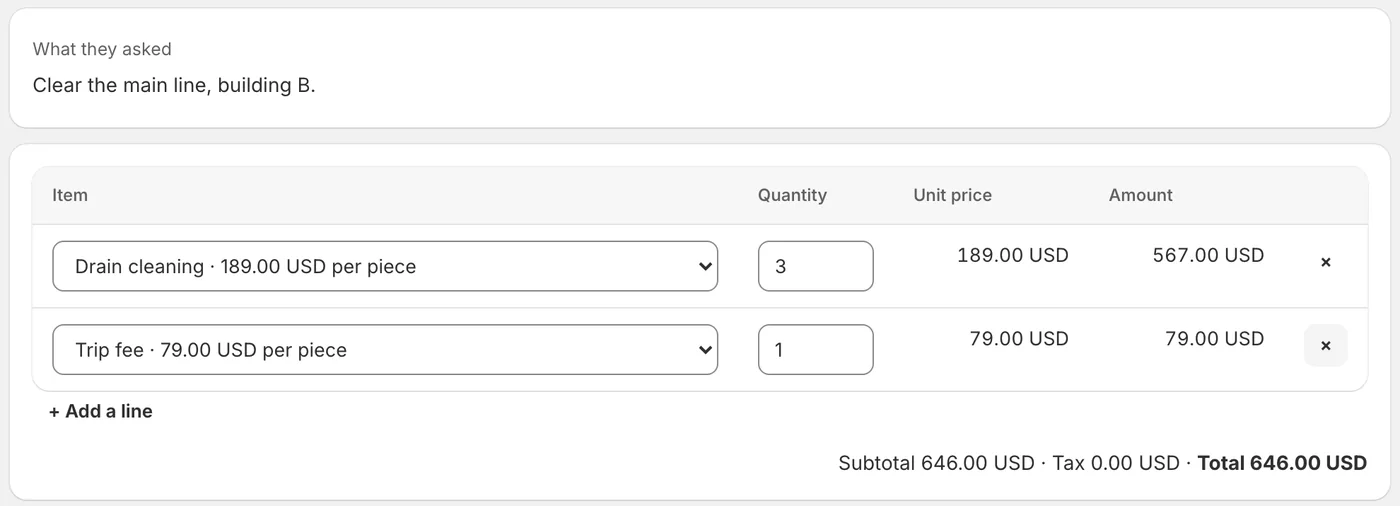
"Clear the main line, building B." From a request like that, the office prepares the estimate with your own items and prices. You check it, change a quantity if you like, add a note on what is included, and press Send. It goes by email with a PDF, or as a link you hand over.
When the customer accepts, you are told, and the next appointment can be offered at once. It is an estimate, not an invoice: your legal invoice still comes from your invoicing tool.
People nearby who need a plumber today.
Every day people ask their neighbours for a trade they can trust. Your office looks for those questions in public posts on Reddit and other places and drafts a helpful reply that says who wrote it, for you to post yourself. For Facebook groups and Nextdoor, our browser extension reads only what is on your own screen; looking through your groups is off until you switch it on, with a plain warning, and it never signs in for you.
It starts with the rules a trade needs.
Your office starts from rules made for trades that go to the customer, each with blanks for your own answers. Nothing answers a customer until you have filled it in and switched it on. Its tone is practical and straightforward, and it never promises a price or a time slot that has not been confirmed.
The rules it starts with
- Licensed and insured
- The area you cover
- Estimates, prices and call-out fees
- Booking a visit, and emergencies
- Cancelling, moving, and payment
Asked before you start.
Can it give a price by message?
Only from your own price list. An estimate is built from your items, every amount is worked out by code, and nothing goes to the customer until you press Send. A price your list does not have is never made up.
How does it handle emergencies?
Your booking rule says how you handle them, and the office answers that. A question your rules do not cover comes to you on Telegram at once, with the customer's words.
Can my technicians use it?
Yes. Each person gets notices about their own jobs, their day as a route on the map, and can tell the customer they are on the way. Each can connect their own Google Calendar.
Does it work outside the US?
Yes. The service area can be a radius around a US ZIP code, a list of postcodes, or towns, and estimates are in your own currency.
Read next
Set up your office in an afternoon.
Free to set up, no card needed. It reads your website, asks what it could not find, and nothing goes live until you have checked it.